


Linux is increasingly being chosen by organizations as the operating system for their enterprise servers and even endpoints. This has led to a significant increase in threat actor activity targeting Linux-based systems. To prevent suffering an infection, it is crucial for enterprises to adhere to struct security practices. Here are some of the most critical ones that you can implement immediately.
1. Sandboxing
A malware sandbox is one of the core components of a proper security infrastructure. This tool provides a safe virtual machine environment for analyzing files and URLs that may pose a risk to your organization’s systems. It makes it possible to detect the threat proactively and prevent infection.
Sandboxes like ANY.RUN offer a complete interactive experience by giving full control over the VM. This makes it possible to engage with the samples you upload to it and the system, including by running programs, opening links, copying and pasting content, rebooting, etc.
Using a sandbox to analyze suspicious emails, attachments, documents, URLs, and more, provides you with the following info:
- A verdict on whether the analyzed sample is malicious.
- Name and type of the malware or threat detected in the sample.
- All the malicious activities associated with the sample.
- The malware’s network communication with its command-and-control (C2) servers.
- A detailed report that includes indicators of compromise (IOCs) that can be used to improve the detection rate of your security systems.
Here is an example of an .elf file analyzed in the ANY.RUN sandbox.
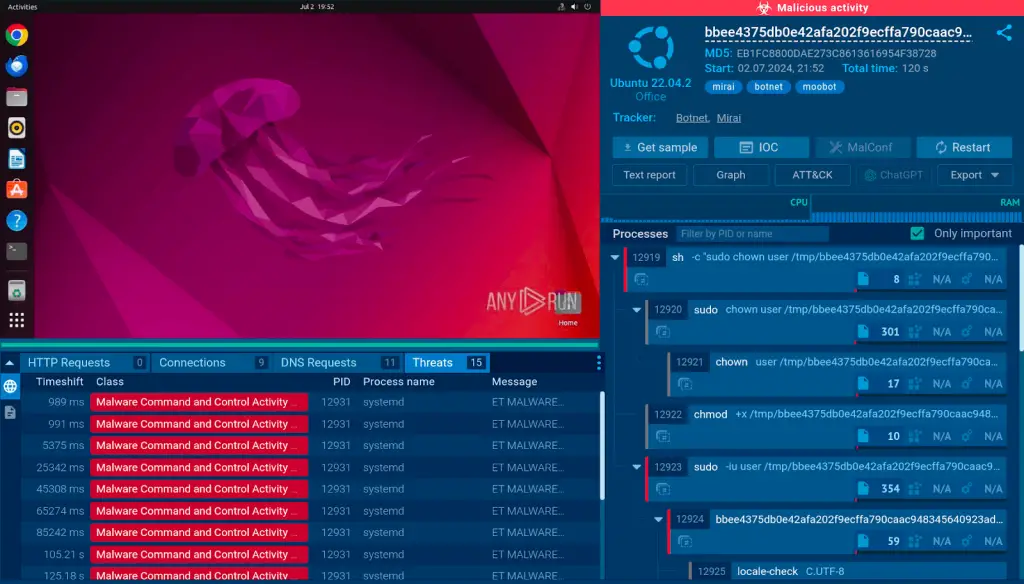
The service quickly identifies the file as malicious and labels it as Mirai, a widespread botnet affecting Linux systems exclusively.
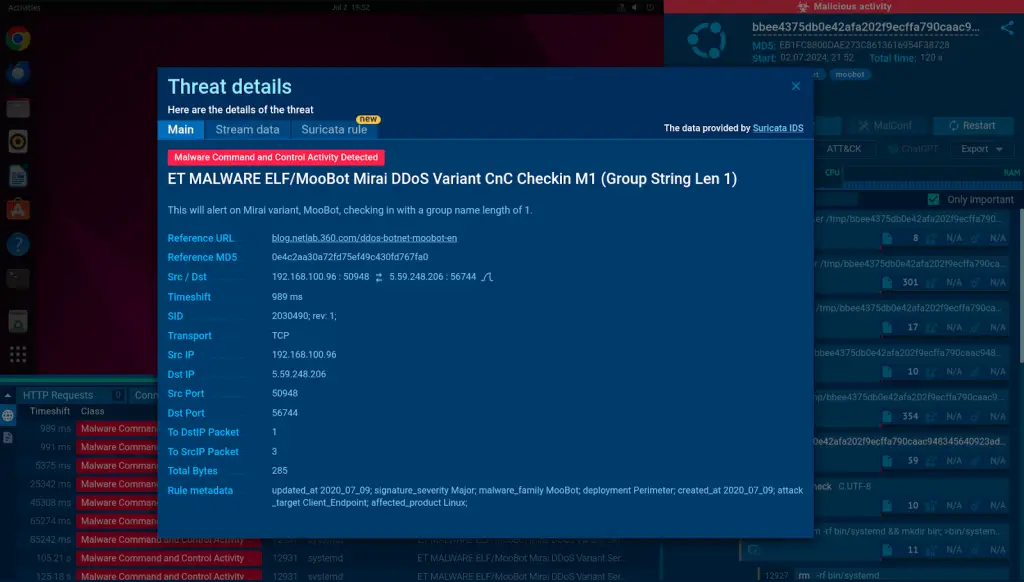
It presents details about the infection, including all the tactics, techniques, and procedures (TTPs) employed by the malware, as well as an overview of the processes tree.
The ANY.RUN sandbox also provides Windows 7 x32 and Windows 10 x64 environments completely for free, allowing you to detect and analyze threats across different OS versions.
2. Regular Updates and Patch Management
One thing that is often underestimated in Linux security is timely updates and patching. Threat actors are always looking for new ways to sidestep existing security checks to carry out successful attacks.
The best way to avoid falling victim to such attacks is to install all the latest updates, as they not only offer new features, but also introduce fixes to recently discovered vulnerabilities.
Organizations must implement an automated patch management policy governing all infrastructure changes, such as kernel and application updates.
3. Implement Access Control
As the size of your organization increases, so does the probability of human error leading to a cyber security breach. That is why it is crucial to limit your employees’ access to the infrastructure based on the principle of least privilege (PoLP).
This simple principle implies that users should be given only the permissions they need to perform their tasks. Linux provides plenty of tools for achieving this, from using sudo for administrative tasks to implementing mandatory access control (MAC) systems like SELinux.
Regularly reviewing user accounts and their permissions also helps to ensure that no unnecessary access rights are granted.
4. Secure Network Services
Network services can pose a serious threat to your systems if they are not properly monitored and secured. The first step should always be to disable any unnecessary services and use firewalls to control incoming and outgoing network traffic.
Utilizing the SSH protocol for remote access and configuring strong authentication methods are also recommended. Larger enterprises should have a dedicated team of security analysts responsible for monitoring network traffic and logs to detect any suspicious activities before the attackers have a chance to inflict any serious damage.
5. Implement Intrusion Detection and Prevention Systems (IDPS)
Another essential element of your strategy should be an Intrusion Detection and Prevention System (IDPS). Thanks to IDPS, enterprises can automate the detection of threats by spotting intrusions and anomalies.
IPDS can alert administrators about potential threats and, in some cases, automatically respond to prevent or mitigate attacks. Examples of IDPS tools for Linux include OSSEC, Snort, and Suricata.
6. Regular Security Audits and Compliance Checks
Regular security audits and compliance checks are essential to ensure that your Linux systems are secure and comply with relevant regulations and standards.
These audits can help identify vulnerabilities, misconfigurations, and other security issues. Enterprises can use automated tools like Lynis, OpenSCAP, or Nessus for security auditing.
It is also recommended to regularly review system and application logs for any signs of security incidents.
Conclusion
Linux security requires regular attention and proactive measures. By following these best practices, enterprises can significantly enhance the security of their Linux systems and reduce the risk of security breaches.
